Databaseless and Serverless Architecture: The Repo Is the Source, Publishing Is a Commit
There is no database behind this blog, and no server kept running. Content is MDX files in the repo, the admin panel is the open-source Decap CMS, and publishing is a commit. Here's how this setup of Next.js, a Git repository and a static host works, where it shines and where it falls short.
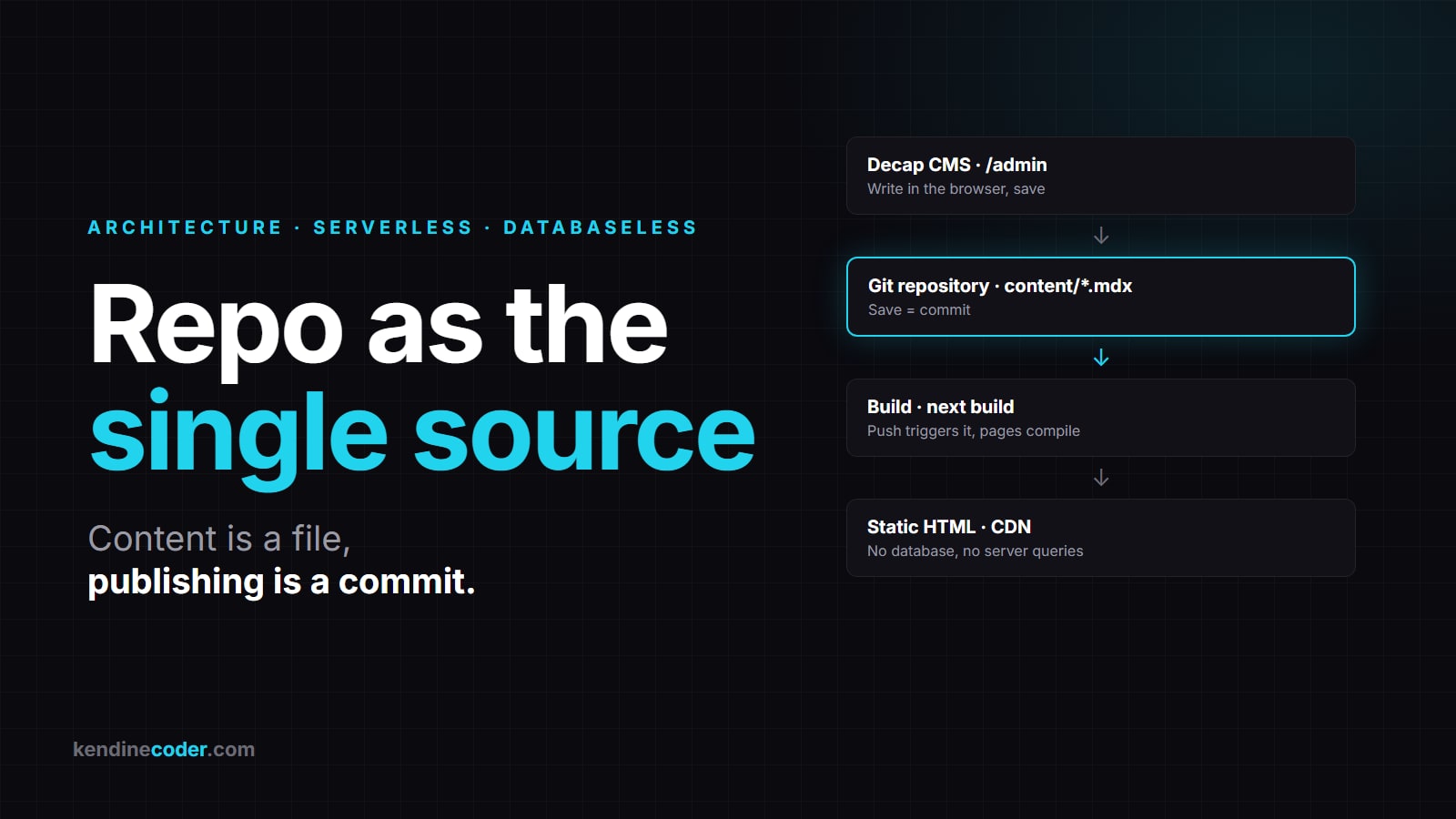
There is no database behind this site. There is no server to keep alive and patch either. The posts are MDX files sitting in the repo, the admin panel is the open-source Decap CMS running in the browser, and publishing means making a commit.
Everyone knows serverless; add databaseless to it. I've set up the same architecture on a few other projects, and it holds up across a wide range, from a personal blog to a corporate marketing site. In this post I'll use kendinecoder.com as the example to walk through the pieces, the publishing flow and the limits.
The idea: the repo is the database
In a classic CMS, a piece of content is a row in a database. The panel writes that row, the application server reads it on every visit and renders the page. All three parts have to stay up all the time.
Here, content is a file. Every post is a .mdx file under content/blog/, and the frontmatter at the top is that post's "columns":
---
title: "Databaseless and Serverless Architecture"
date: "2026-10-25"
tags: [Architecture, Databaseless]
coverImage:
  src: /images/uploads/databaseless-mimari-kapak.jpg
published: true
---

The body of the post is Markdown. React components can go in between.
Everything a database gives you has a counterpart in the file system:
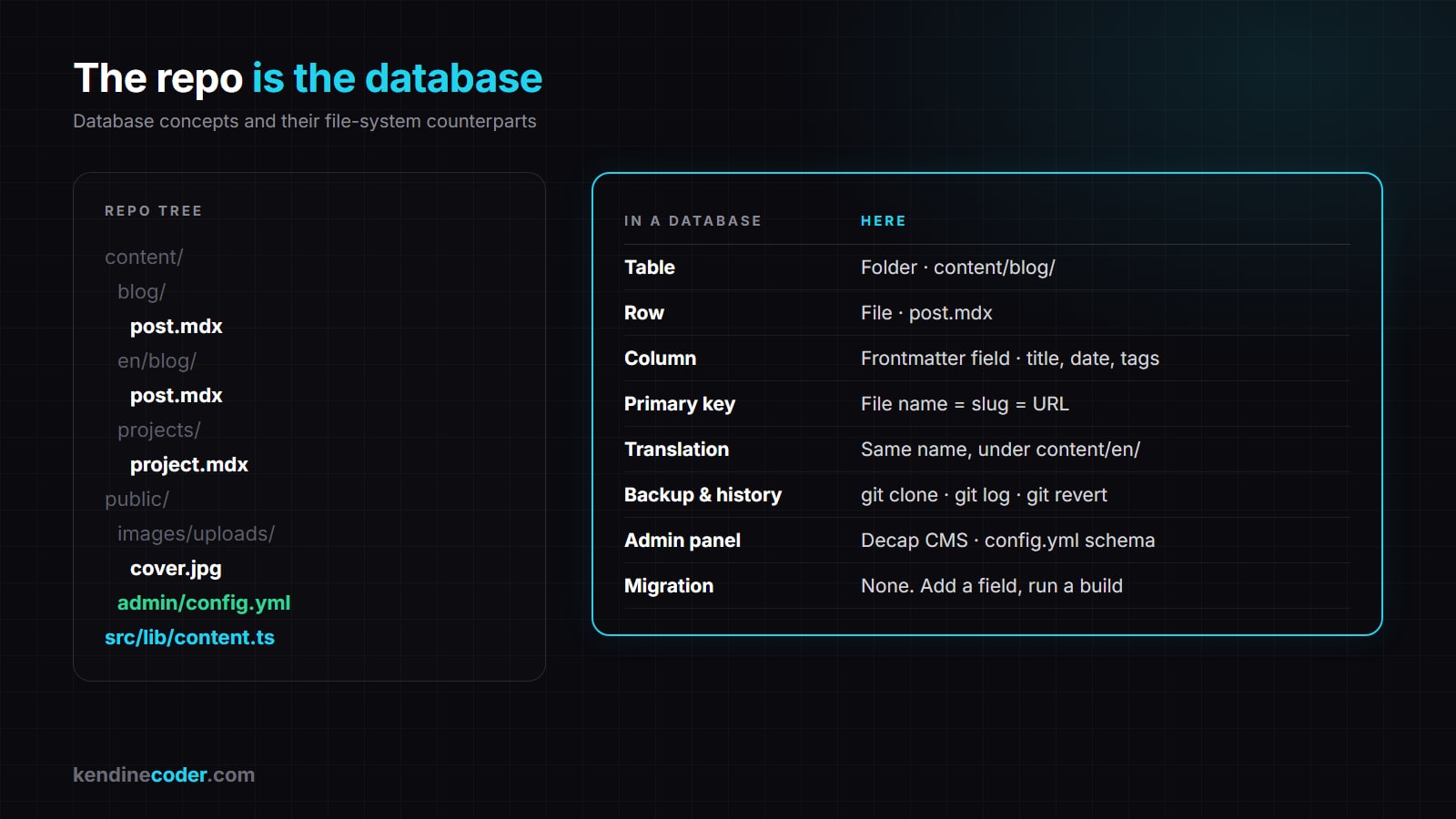
The file name is also the slug, i.e. the URL. A translation is a second file with the same name under content/en/blog/. Images live in public/images/uploads/ and they're in the repo too. There is no such thing as a migration: you add a field to the frontmatter and run a build.
The pieces
The setup has four parts, and none of them is a server you operate.
- Next.js (App Router): Reads the
content/folder at build time and generates a page for each file.gray-mattersplits off the frontmatter,next-mdx-remotecompiles the body. The output is static HTML. - Decap CMS: An open-source, Git-based admin panel. It's a static page under
public/admin/, and its schema is a singleconfig.ymlfile. When you hit "save" in the panel, it commits the file through your Git provider's API. - A Git repository: The single source of truth for content. GitHub, GitLab, Bitbucket, Gitea; any provider Decap supports. History, backups, rollback and review (pull requests) come for free.
- A static host: Sees the push, runs the build and ships the output to a CDN. Vercel, Netlify, Cloudflare Pages and the like all do this the same way; switching between them is a matter of connecting the repo. No server management.
Decap's schema is short and readable:
backend:
  name: github        # or gitlab, bitbucket, gitea
  repo: user/site
  branch: main

media_folder: "public/images/uploads"
public_folder: "/images/uploads"

collections:
  - name: "blog"
    folder: "content/blog"
    create: true
    extension: "mdx"
    fields:
      - { label: "Title", name: "title", widget: "string" }
      - { label: "Date", name: "date", widget: "datetime" }
      - { label: "Cover", name: "coverImage", widget: "image" }
      - { label: "Publish", name: "published", widget: "boolean" }
      - { label: "Body", name: "body", widget: "markdown" }
That's it. The form you see in the panel is generated from this file; when you want a new field, you add a line here.
The content reader on the Next side is just as plain. It lists the files in the folder, splits the frontmatter and sorts by date:
export function getAllContent<T>(type: "blog" | "projects") {
  const dir = path.join(process.cwd(), "content", type);
  return fs
    .readdirSync(dir)
    .filter((f) => f.endsWith(".mdx"))
    .map((f) => {
      const { data, content } = matter(fs.readFileSync(path.join(dir, f), "utf-8"));
      return { slug: f.replace(/\.mdx$/, ""), frontmatter: data as T, content };
    })
    .sort((a, b) => Date.parse(b.frontmatter.date) - Date.parse(a.frontmatter.date));
}
The page component returns every slug from generateStaticParams, and Next produces the HTML for each one at build time. Nothing queries anything when a visitor arrives.
The publishing flow: how a post becomes a page
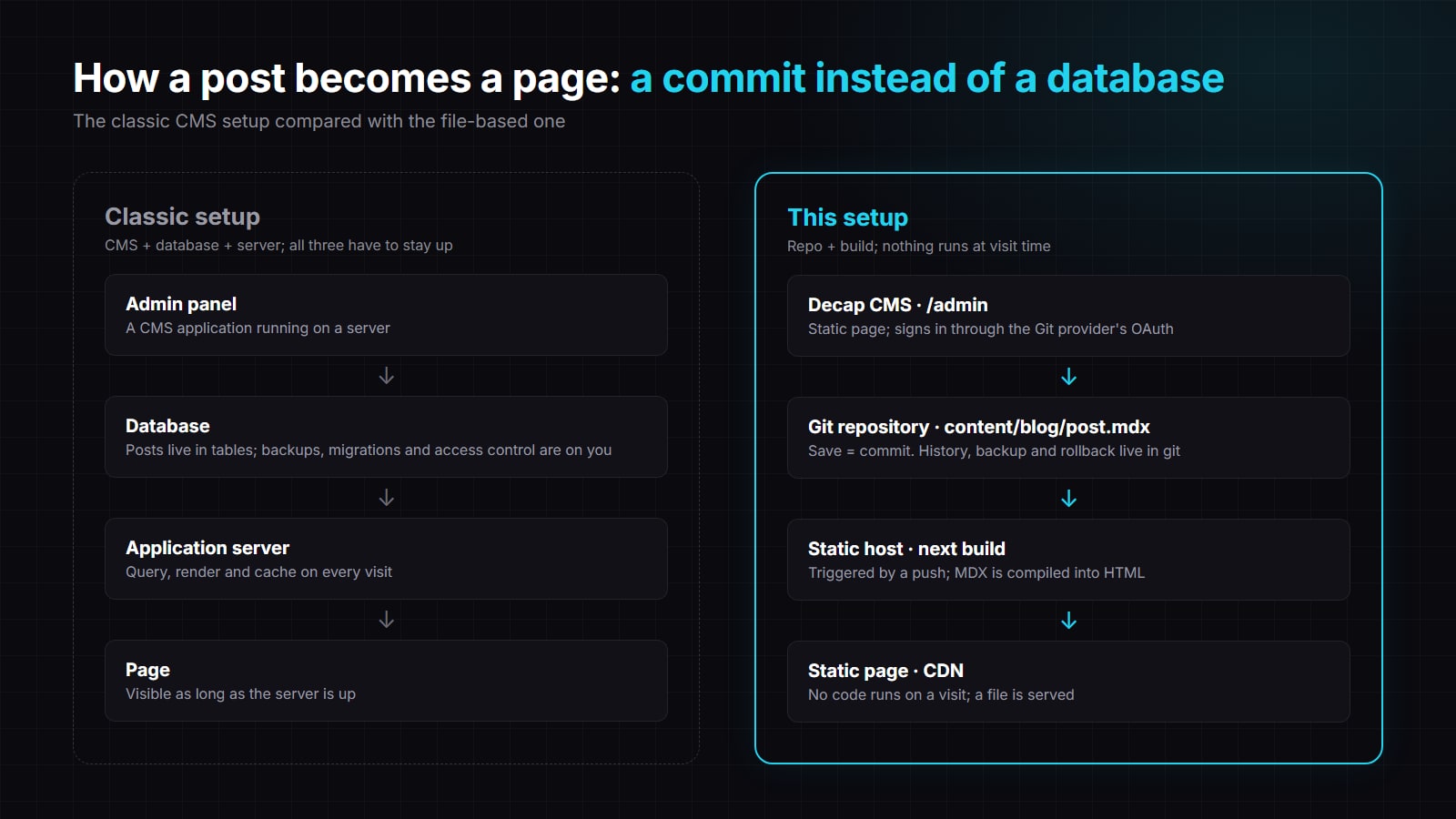
- You open
/admin. Decap authenticates you through your Git provider's OAuth. Next provides two tiny API routes for this: one redirects to the provider, the other exchanges the returned code for a token. That's the entire "server" side of the setup, and it only runs at sign-in. - You write the post and save it. Decap pushes
content/blog/post.mdxand any images you uploaded to themainbranch as a single commit. - The host sees the push and runs
next build. The sitemap is generated along the way; a new file needs no extra configuration. - A minute or two later the page is on the CDN. The previous version is one commit behind; if something breaks, you
git revert.
For someone who doesn't want a panel, the flow is even shorter: write the file in your editor and git push. Decap is only there so a non-technical content owner can do the same job from a browser.
Why this setup?
- Zero cost. The free tiers of Git providers and static hosts are more than enough for this. No database bill, no server bill.
- Backup and history built in. Every change is a commit. Who changed what, and when, is answered by
git log. - Small attack surface. What the visitor hits is a static file. No SQL, no sessions, no admin app waiting for patches.
- Fast. Every page is pre-rendered and served from a CDN.
- Portable and independent. The whole site is one
git clone. If you tire of your host, the same repo runs unchanged on another one or on your own machine. Changing Git providers is changing a remote URL. - Review workflow for free. Content can arrive through pull requests just like code; with more than one author, that's a real comfort.
Where it falls short
The limit is clear: data produced by visitors. Comments, likes, form submissions, carts, user accounts: these are outside the scope of this architecture, because they aren't something you commit. A blog or a news site can go live without any of them. If you want them later, you plug in a ready-made comment or form service; the content still lives in the repo and never touches that service.
Other limits:
- Frequently changing data. For a price list that updates dozens of times a day, running a build on every change gets tiring.
- Search and filtering. Up to a few hundred items, an index generated at build time is enough; with tens of thousands of records you need a separate search service.
- Concurrent editing. If two people change the same file at the same time, you get a git conflict. Decap offers an editorial workflow (draft, review, publish), but it isn't Google Docs.
- Build time. Builds get longer as content grows. At a few hundred pages it's on the order of a minute, no problem; at tens of thousands you'd move to incremental generation.
The rule is simple: if you produce the data, it goes in the repo; if the visitor produces it, it goes in a database. Don't mix the two.
Who is it for?
Personal blogs, portfolios, corporate marketing sites, product documentation, a small listings or product catalogue, event pages. They all share the same profile: a known handful of people produce the content, visitors read it. Carrying a database for that profile is like paying insurance on a car you'll never drive.
These days the first question I ask when starting a new site is: Is there any data here that the visitor produces? If not, the repo is enough.
Does your site really need its database, or is it there out of habit? Let's talk in the comments. Happy coding!
Muhammed Emin Özdemir
Senior full-stack developer at VakıfBank. Focused on enterprise systems, clean code and LLM-based tools.
More about me →
Comments
Be the first to comment